Connect an AI agent
Create a read-only agent key in the client's settings, then connect Claude Code with one terminal command. The agent can list the client's open fixes in priority order and read one fix's searches, evidence and instructions, including what not to change. It can't edit the site or mark fixes done; you log its change note.
What it doesn't do: The agent reads the latest synced data. Fetching fixes never runs a sync, spends credits or changes a fix's status.
Updated
1. Create a key
Open the client, then Settings › AI agent, and click Create read-only key. Keys start with rua_, cover one client and are stored as a hash. Copy the key right away: “It won't be shown again after you leave this page.”
The same panel has Replace key and Revoke access, and shows when the key was last used.
2. Connect Claude Code
In the site's project folder, run the command the panel shows. It already holds the client's ID and, right after you create a key, the key itself:
claude mcp add --transport http --scope local rankupside-<client id> https://rankupside.com/api/mcp --header "Authorization: Bearer YOUR_API_KEY"
The connection is saved for that project only. Open Claude Code in the same folder.
3. Ask for the fixes
Try the prompt from the panel:
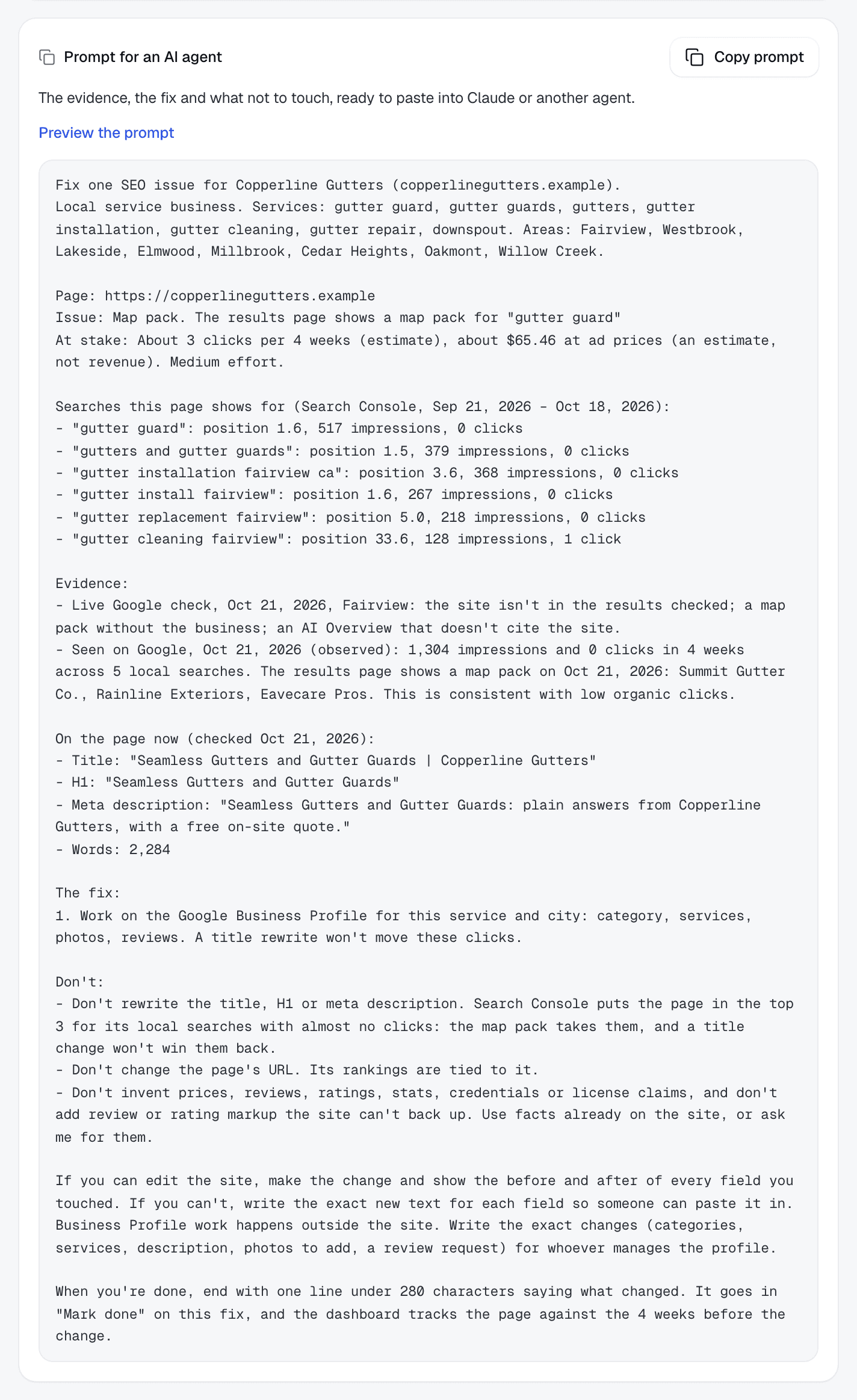
Pull this client’s SEO fixes. Read the evidence and instructions for the highest-priority fix, then help me implement it.
The agent reads the latest synced data. Fetching fixes never runs a sync, spends credits or changes a fix's status.
The two tools
| Tool | What it returns | Inputs |
|---|---|---|
list_fixes | The client's open fixes in priority order, each with page, cause, effort and estimated clicks at stake, plus the last sync date. | offset, and limit up to 50 |
get_fix | One open fix's searches, evidence, current page details and complete instructions, including what not to change. | The fix's key from list_fixes |
Both tools are marked read-only to the agent.
Other agents
Any agent that speaks MCP can use the server URL https://rankupside.com/api/mcp. Agents that don't can call the read-only JSON API with the same key:
curl https://rankupside.com/api/agent/fixes \
  -H "Authorization: Bearer YOUR_API_KEY"

# One fix, with its full evidence and prompt
curl "https://rankupside.com/api/agent/fixes?key=<fix key>" \
  -H "Authorization: Bearer YOUR_API_KEY"
- Requests from a browser on another website are rejected.
- Each key gets 60 requests a minute. Past that, the API answers 429 with Retry-After: 60.
Close the loop
When the work is done, open the fix in RankUpside and click Mark done with the agent's change note. The prompt asks the agent to end with that one-line note. Tracking then compares the page with the 4 weeks before the change, for 8 weeks, and reads “consistent with the change” when it moves.
How fixes are ranked: Ranked fixes. What the key can and can't reach: Data and permissions and Security.
Prefer pasting?
Copy prompt on any fix, or Copy all on the fix list, works without a key. Paste it into any AI assistant. Revoking a key doesn't affect it.
Something missing or out of date? Email hello@rankupside.com.
Questions.
Can the agent change my client's website through RankUpside?
Does an agent key work for every client?
What happens when I revoke a key?
Is the fix data sent to Anthropic or other AI companies?
Related
- FeatureRanked fixesOne fix list per client, ranked by what's at stake, with the page, the searches and what not to touch. Mark it done and the report tracks the result.
- DocsData and permissionsThe Google permission RankUpside asks for, what it stores per client, how long history is kept, how lead contacts are hashed, and how to delete it.
- RankUpsideSecurityWhat RankUpside can access in Google (read-only Search Console), what it stores, how reports and agent keys are protected, and how to revoke or delete.
- DocsGetting startedSign in with Google, add client sites from Search Console, set services and areas, review the first fixes, brand the report and share the link.