Skip to content
Integration

Add the landing page and lead source to every form

The RankUpside form snippet is one script tag for the client's site. It remembers the page a visitor first landed on and whether they came from search, then adds both to every form as hidden fields named landing_page and lead_source. The CRM stores them with the lead, and won deals carry them back by CSV or webhook.

What it doesn't do: The snippet sends nothing to us and sets no cookies. It can't reach forms inside an iframe; those need the values passed another way.

Updated

Paste one line.

Add the snippet to the client's site before </body>. Copy it from Client settings › Leads & revenue. From then on, every form on every page carries the visitor's first landing page and how they arrived.

  • One script tag, loaded with defer
  • No settings, no account on the client's site
  • Works with any form that sits directly on the page
<script src="https://rankupside.com/t.js" defer></script>
Before the closing body tag. Snippet
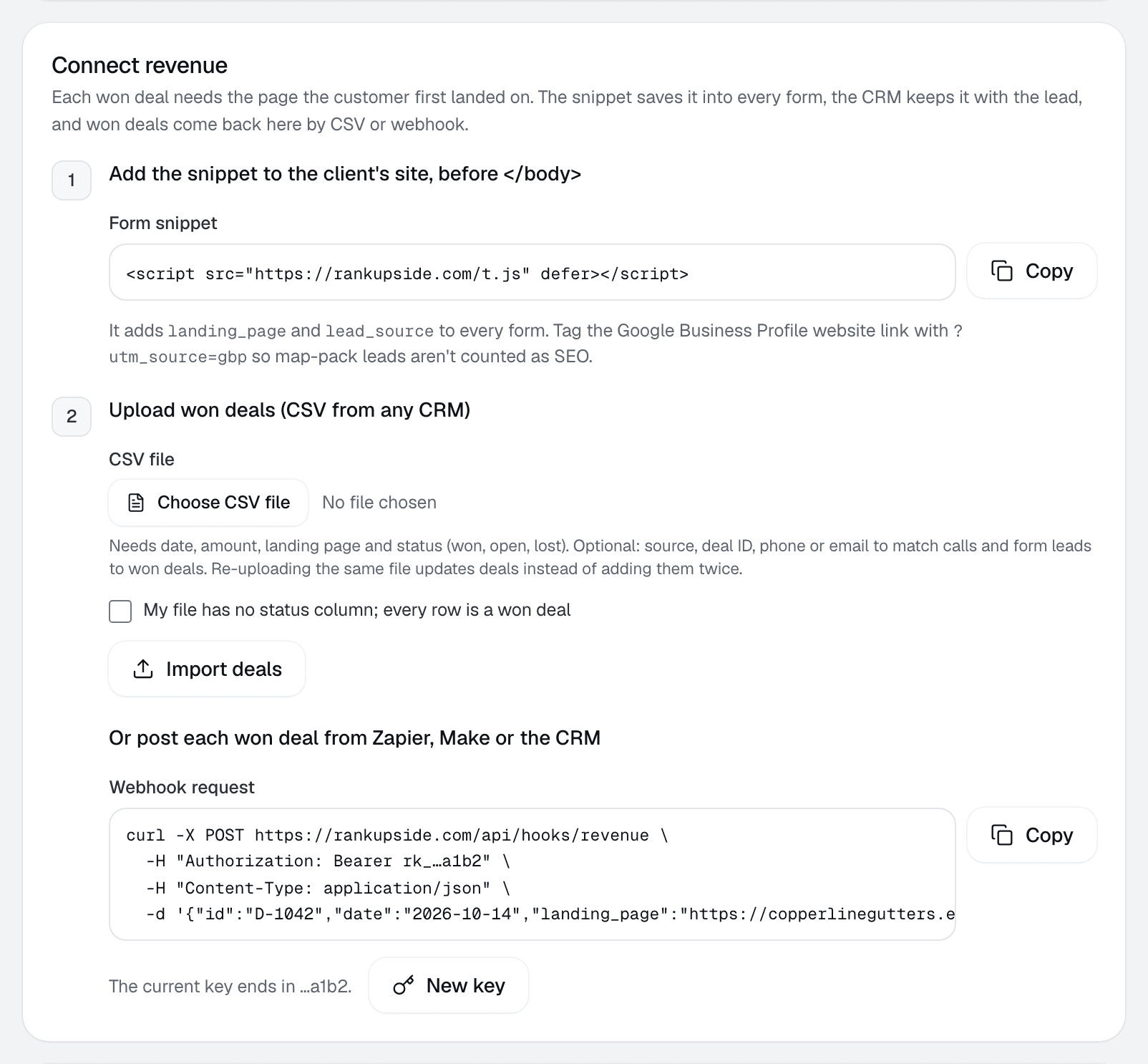
Client settings, Connect revenue, step 1: add the snippet to the client's site, with a Copy button and the utm_source=gbp tip.
Client settings › Leads & revenue

More on this:Form snippet docs

Start free trialStarts with one read-only Google sign-in. No card.

What it records.

landing_page is the first page's address without the query string. lead_source is one of these, checked in this order:

lead_source values the snippet records and when
lead_sourceWhen
paidThe landing URL has gclid, gbraid or wbraid, or a utm_medium of cpc, ppc or paid
utm_source / utm_mediumThe landing URL is tagged with UTM parameters, for example gbp
google mapsThe visitor came from maps.google
organicThe visitor came from Google, Bing, DuckDuckGo, Yahoo or Ecosia search
referral: hostAnother site linked to the page
directNone of the above

How it decides the first page.

The first landing page and source are kept in the browser's local storage for 90 days. A later visit from search, ads or a referral replaces them; a direct visit doesn't, so a returning visitor who types the address keeps their original source. Fields a form already fills are never overwritten.

Does it send anything to us?

No. The snippet only fills form fields. It makes no network calls and sets no cookies.

Which forms does it reach?

Every form in the page itself, filled on load and again on submit. Forms inside an iframe can't be reached by a script on the parent page.

Keep map-pack leads apart.

Leads from the client's Business Profile belong to the map pack, not to SEO. Tag the website link on the profile and those leads are recorded as gbp, then kept out of organic search revenue.

The Business Profile website link before and after tagging
Website link on the Business Profilelead_source
Beforehttps://copperlinegutters.example/organic or google maps
Afterhttps://copperlinegutters.example/?utm_source=gbpgbp
Sample domain. The report keeps gbp, Maps and other channels out of search revenue.

More on this:RankUpside for local SEO agencies

Forms that post with JavaScript.

Custom forms that send their data with JavaScript can read window.searchRevenue, which holds landingPage and source. Forms embedded in an iframe, as some GoHighLevel and HubSpot embeds are, need the values passed into the iframe's URL or captured by the CRM's own landing-page field.

// For forms that post with JavaScript instead of a normal submit
const { landingPage, source } = window.searchRevenue;
await fetch("/your-form-endpoint", {
  method: "POST",
  body: JSON.stringify({ ...fields, landing_page: landingPage, lead_source: source }),
});
Example only: the endpoint and field names are the form's own.

Then send won deals back.

The snippet gets the landing page into the CRM. When a lead becomes a won deal, send it back with that landing page, by CSV or webhook, and the report can tie it to searches.

  1. Visitor landsFrom search, on a page of the client's site
  2. Fills a formlanding_page and lead_source ride along
  3. CRM keeps themOn the lead, then on the won deal
  4. Deal comes backBy CSV or webhook, with its landing page
Then the report splits the deal across that page's searches by click share.

More on this:CSV importWebhooksAttribution docsAllocated revenue

Form snippet questions.

What does the RankUpside form snippet do?
It adds two hidden fields, landing_page and lead_source, to every form on the page. The values come from the first page the visitor landed on and how they arrived: organic search, Google Maps, paid ads, a tagged campaign, a referral or direct.
Does the snippet send visitor data to RankUpside?
No. It only fills form fields on the client's site. The data reaches RankUpside later, when won deals come back from the CRM by CSV or webhook.
Does it use cookies?
No. It stores the first landing page and source in the browser's local storage for 90 days.
Will it overwrite fields my forms already have?
No. If a form already has a landing_page or lead_source value, the snippet leaves it alone.
Does it work with GoHighLevel or HubSpot forms?
It works with any form that sits directly on the page. Forms loaded inside an iframe can't be reached by a script on the parent page; pass the values into the iframe URL, or use the CRM's own landing-page field.
How do I stop Business Profile leads counting as SEO?
Add ?utm_source=gbp to the website link on the Business Profile. Those leads are recorded with source gbp and kept out of organic search revenue.

Connect a client and see their first report.

The first report builds from 13 weeks of Search Console history as soon as you connect. Start with 3 client sites.

What your client sees each weekSample data
Oxbow & Vane

Weekly search report · Copperline Gutters

Sep 14 – Oct 11, 2026 vs the 4 weeks before

Copperline Gutters got 27 clicks from named buyer searches in the last 4 weeks, up 23% from the 4 weeks before. Google hides the search terms behind 84% of all 289 search clicks. Rankings rose across the site: pages that steadily show up are up about 2.4 positions.

Buyer clicks23%
27from 22
All search clicks14%
289from 253