Skip to content
Integration

A Google Search Console dashboard for every client site

RankUpside connects to Google Search Console with one read-only Google sign-in and lists every property the account can see. Pick your clients, and each one loads 13 weeks of search data right away, then syncs every Wednesday. You get one dashboard across all clients, the cause behind each change, ranked fixes and a client report.

What it doesn't do: It can't change anything in Search Console, and it reads web search only, not Discover, News, image or video results.

Updated · Data through · Sample data

Every property, one dashboard.

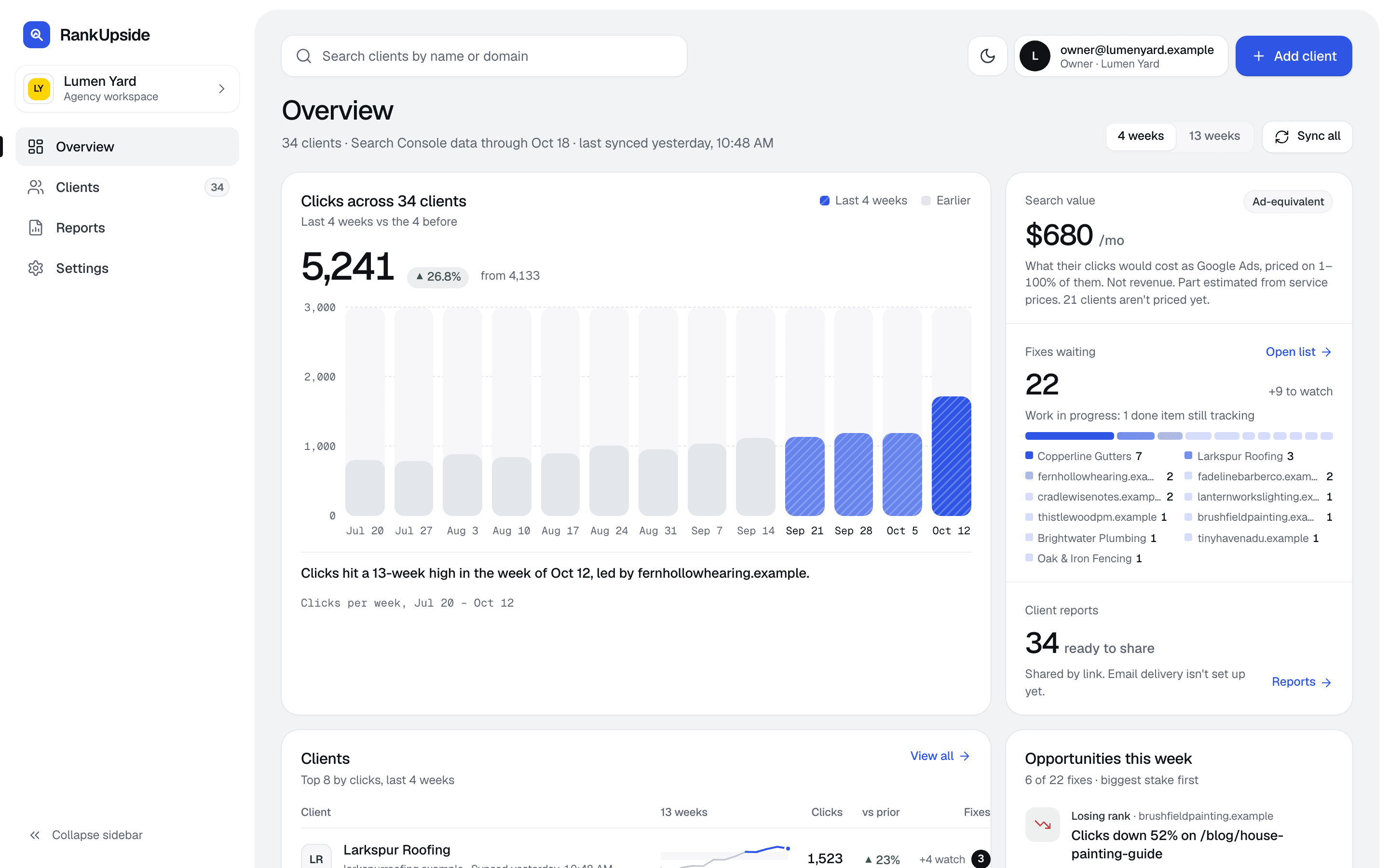
Sign in once and every Search Console property the account can see is listed. Tick your clients and the overview shows all of them together: clicks over 13 weeks, the fixes waiting for each one and the reports ready to send. No switching properties one by one.

  • Every client's clicks on one chart
  • Fixes and reports per client
  • Synced every Wednesday
The agency overview: clicks across all clients over 13 weeks, search value, fixes waiting by client and reports ready to share.
The agency overview · Sample data, fictional clients

Method:NativeSign in with Google and pick the properties.

Start free trialStarts with one read-only Google sign-in. No card.

What we read from Search Console.

Web search data by page and by search, every week, plus Google's own indexing verdicts. Nothing is written back.

What is read from Search Console, how often and what it's used for
DataHow oftenUsed for
Property listOn sign-in and when adding clientsPicking which properties are clients
Clicks, impressions and position by page and searchWeekly, web searchTrends, wins and losses, the cause of each change
Page totalsWeeklyThe Pages tab and per-page trends
URL Inspection resultsAbout every 14 days per pageIndexing status and the Not indexed finding
History13 weeks on connect, then backfilledAbout 16 months of weekly history
Discover, News, image and video results aren't read.

More on this:Connect Search ConsoleImpressionsHidden searches

Read-only, and you can revoke it.

The sign-in asks for one Search Console permission, View Search Console data for your verified sites, plus your basic profile and email. RankUpside can't change settings, submit sitemaps or remove URLs, and it doesn't ask for Gmail, Drive, Analytics or Google Ads.

The Google refresh token is stored encrypted. Remove access any time at myaccount.google.com/permissions.

More on this:SecurityData and permissions

What RankUpside can see

One Google permission, read-only

Google scope

View Search Console data for your verified sites

webmasters.readonly

  • Clicks, impressions and positions by page and search, 13 weeks back
  • Page titles, fetched from the client's public site
  • No edits in Search Console or anywhere in Google
  • No access to Gmail, Drive, Analytics or Ads

Revoke access any time at myaccount.google.com/permissions. Google tokens are stored encrypted.

Start free trialStarts with one read-only Google sign-in. No card.

What Search Console alone doesn't tell you.

Search Console has the numbers. It doesn't say why they moved, what to fix first or how to show a client. Here is the same client in both.

Search Console's Performance report next to the same client in RankUpside
QuestionSearch ConsoleRankUpside
How are all my clients doing?One property at a timeAll clients on one screen
Why did clicks change?Position and CTR onlyA named cause: map pack, AI answer, city in title, losing rank and more
What should we fix first?No fix listFixes ranked by what's at stake
What do I send the client?No client reportA white-label link and PDF
How much is hidden?Hidden searches aren't labeledThe hidden-query share, shown per client

More on this:Why clicks movedRankUpside for agenciesRankUpside and Looker Studio

Numbers that won't match exactly, and why.

Report impressions and average position are added up from page rows. Search Console's property total counts one impression per results page, so when two of a site's pages show for one search, the report counts two. Totals run higher and position a little worse than the property view.

  • Impressions run higher than the property total
  • Average position reads a little worse
  • The report tiles say "added up per page"
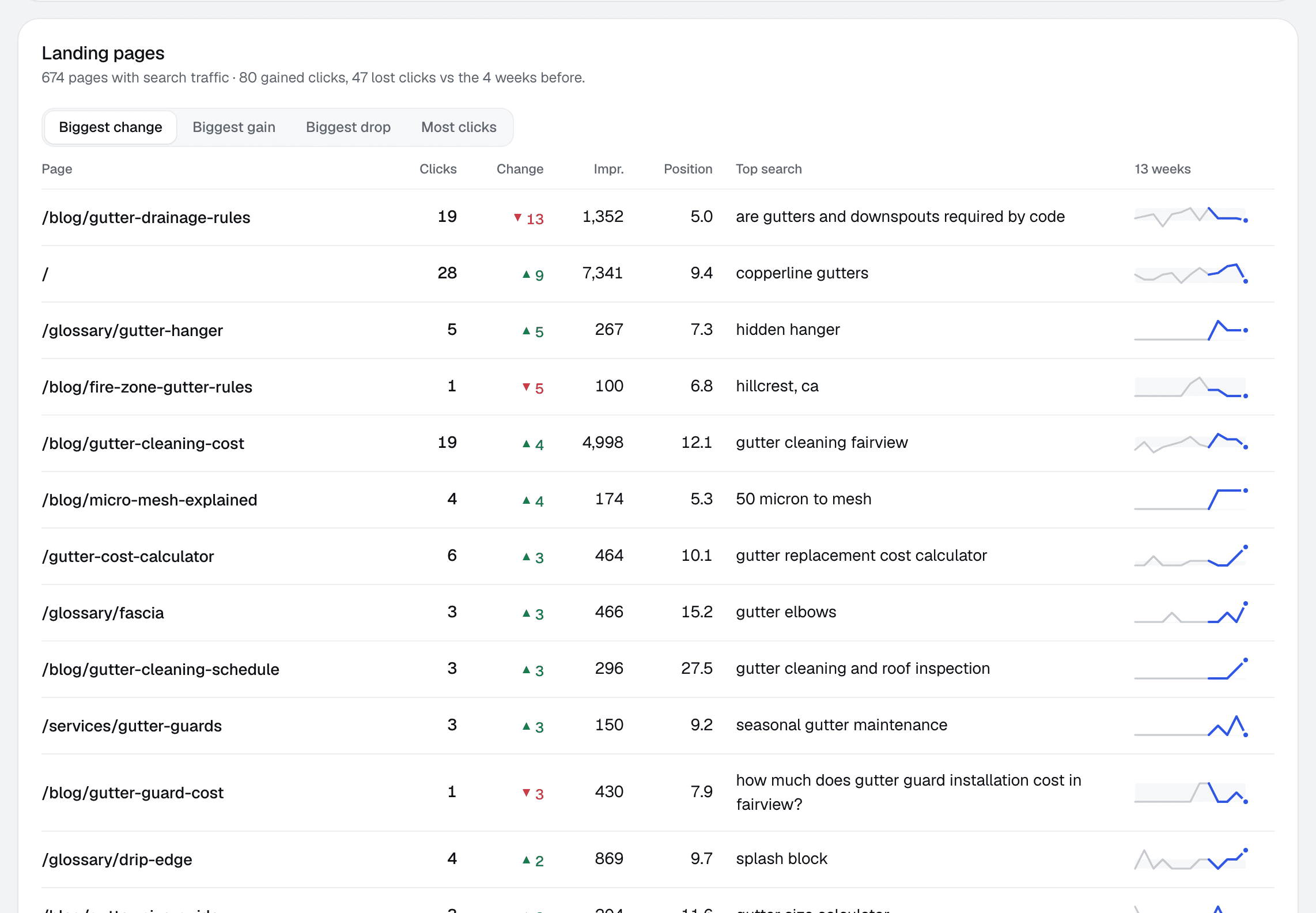
Landing pages for one client: clicks, change, impressions, position and top search for each page.
Client page › Searches › Pages · Sample data, fictional client

More on this:Average positionImpressionsKnown limits

Several Google accounts.

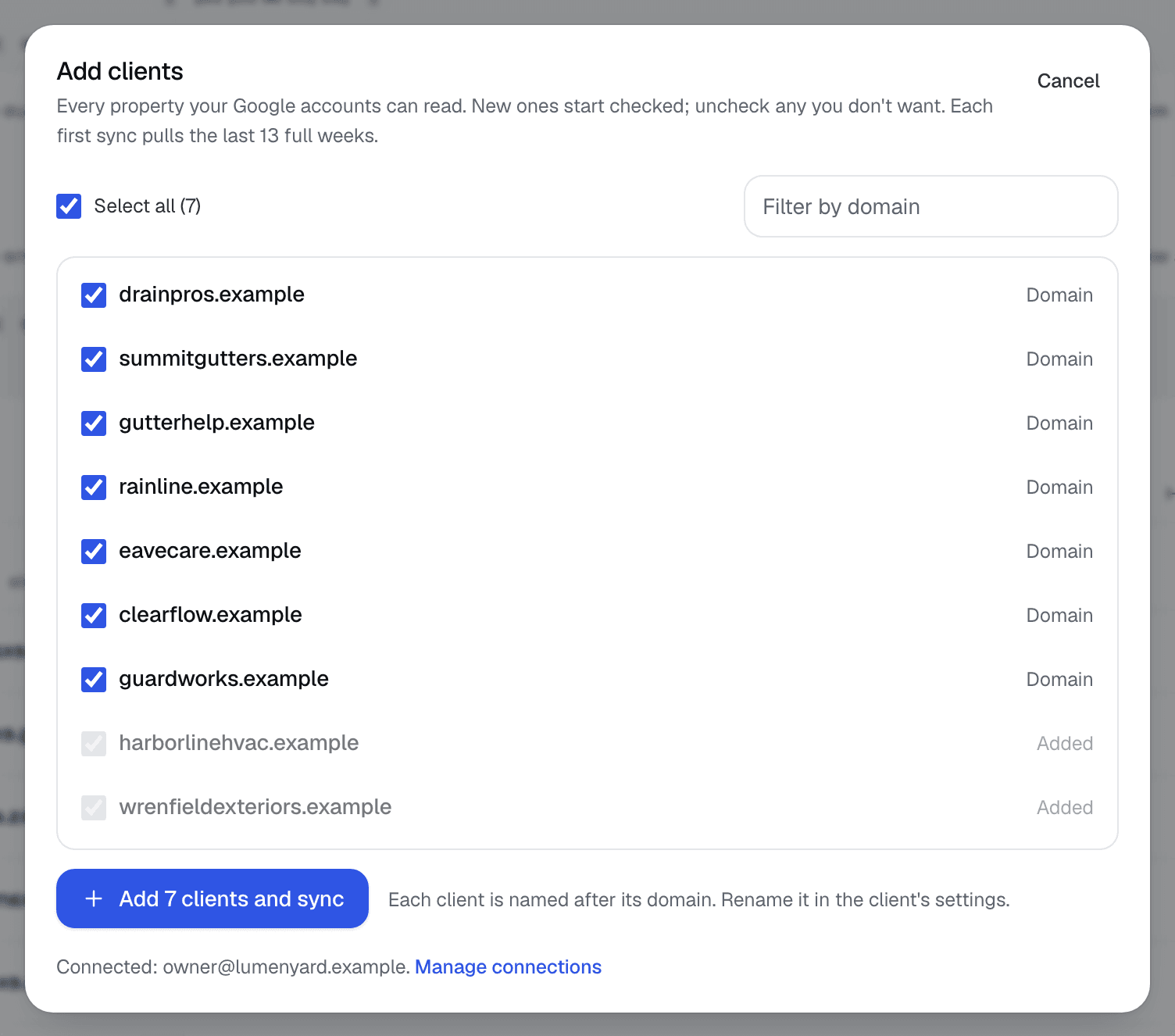
Clients' properties often sit under different logins. Connect another Google account in Settings › Connections and its properties join the add-clients list. One Search Console property is one site, whether it's a domain or a URL-prefix property.

  • Every connected account's properties in one list
  • New properties start checked; added ones are marked
  • Each new client loads 13 weeks right away
The Add clients list: every Search Console property the connected Google accounts can read, new ones checked and added ones greyed out.
Clients › Add clients · Sample data, fictional properties

Data export.

What you can take out of RankUpside today, and what you can't yet.

Ways to get data out today
ExportToday
Client report as a PDFYes
Fix list as a copyable promptYes
Fixes through a read-only agent key (MCP)Yes
Raw Search Console rows as CSVNot yet

Search Console questions.

What access does RankUpside need to Search Console?
Read-only access through a Google sign-in, plus your basic profile and email. It can't change settings, submit sitemaps or remove URLs. You can revoke it from your Google account at any time.
How much Search Console history does RankUpside load?
Thirteen full weeks as soon as you add a client, so the first report has a comparison period. It then backfills and keeps about 16 months of weekly history.
How often does the data update?
Every Wednesday. Search Console data runs a few days behind, so a Wednesday sync covers the last complete week.
Why don't my impressions match Search Console exactly?
RankUpside adds impressions and position up per page. Search Console's property total counts one impression per results page, so our totals run higher and average position a little worse. The report tiles say "added up per page".
Can I connect properties from more than one Google account?
Yes. Add another Google account in Settings › Connections, and its properties appear in the add-clients list.
Does a domain property count as one site?
Yes. One Search Console property is one site, whether it's a domain property or a URL-prefix property.
Can I export Search Console data from RankUpside?
Not as a raw CSV today. You can download each client report as a PDF, copy the fix list, or pull fixes through a read-only agent key.

Connect a client and see their first report.

The first report builds from 13 weeks of Search Console history as soon as you connect. Start with 3 client sites.

What your client sees each weekSample data
Oxbow & Vane

Weekly search report · Copperline Gutters

Sep 14 – Oct 11, 2026 vs the 4 weeks before

Copperline Gutters got 27 clicks from named buyer searches in the last 4 weeks, up 23% from the 4 weeks before. Google hides the search terms behind 84% of all 289 search clicks. Rankings rose across the site: pages that steadily show up are up about 2.4 positions.

Buyer clicks23%
27from 22
All search clicks14%
289from 253