Revenue by search: which searches brought paying customers
RankUpside matches each won deal from a client's CRM to the page the customer landed on, then splits its value across that page's Google searches by share of clicks over 13 weeks. Searches Google hides keep their own line, so no single search is over-credited. It's an optional, allocated figure that sits beside the click trends.
What it doesn't do: Search Console has no visitor-level data, so this is an allocation by click share, not proof that a search caused a sale. Deals without a landing page show as unmatched.
Searches behind the revenueSample$5,390 from 3 won jobs. Google hides the search terms behind 84% of clicks, so that share keeps its own line. Sample data · fictional deals.
A won deal joins to the page the customer landed on. Its value is split across that page's searches by each search's share of the page's clicks over 13 weeks. The share Google doesn't name stays on its own line, and deals that can't be matched are listed apart.
1Won dealFrom the CRM: date, amount, landing page
2Landing pageJoined to the page in Search Console
3Split by click shareAcross that page's searches, 13 weeks
4Hidden searchesKeep their own line, never spread
No landing page, or a page with no search clicks in the window: the deal is listed as unmatched and isn't credited to any search.
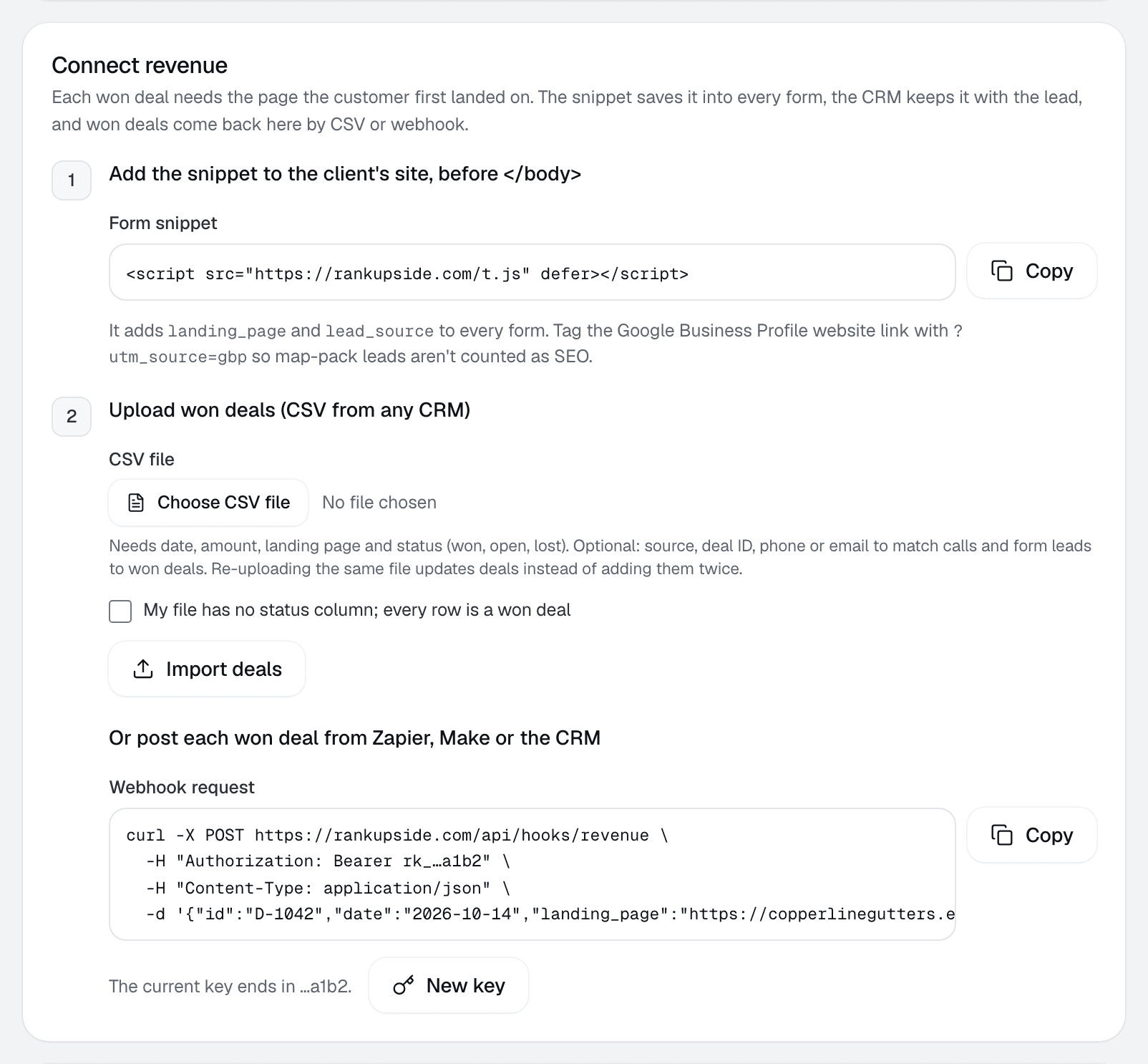
Upload a CSV from any CRM with a date, an amount and a landing page. Post deals to a webhook with a key per client site, one at a time or up to 500 per request. Or add the form snippet, which puts landing_page and lead_source on every form so the CRM keeps them.
Start free trialStarts with one read-only Google sign-in. No card.
Calls count too.
Calls and form leads from CallRail or WhatConverts arrive by webhook with their landing page. When a won deal comes in with the same phone or email within 120 days, it links to the lead. Phone numbers and emails are kept only as salted hashes, plus the last two digits of the phone.
Calls and leads
From CallRail · Copperline Gutters
Sample data
Sample calls and leads by landing page, with the won deal each links to
Landing page
Type
Source
Length
Phone
Won deal
/
Call
google / organic
4:12
…42
$4,200
/services/gutter-repair
Call
google / organic
2:37
…07
$850
/blog/gutter-cleaning-fairview-cost
Call
google / organic
1:48
…63
$340
/
Business Profile call
gbp / maps
3:05
…18
Kept apart from search
Phone numbers are stored as salted hashes; only the last two digits show. A won deal links to a lead with the same contact within 120 days.
What's left out, on purpose.
Search revenue should only hold deals that came from search. These rules keep other channels and unknowns out of it, and each is shown, not hidden.
Deals kept out of search revenue and how each is shown
Deal
What happens
Source names ads, social, email, Yelp or the Business Profile
Excluded from search revenue and counted under other channels
Blank source
Counted, and flagged so you can fix the source
No landing page
Listed under unmatched deals
Landing page with no search clicks in the window
Listed under unmatched deals
Open or lost
Open shows as pipeline; lost isn't revenue
Where clients see it.
Once won deals exist, the report adds Pages that brought paying customers and the searches behind them. Without deals, it still leads with what moved, why and the fixes, and shows the search traffic value at ad prices instead (market data).
Sample pages with won deals and their allocated revenue
Page
Won
Allocated
/
Gutter guard install
$4,200
/services/gutter-repair
Gutter repair
$850
/blog/gutter-cleaning-fairview-cost
Gutter cleaning
$340
Copperline Gutters · fictional deals. The section appears only when won deals exist.
Revenue questions.
How does RankUpside tie a sale to a Google search?
It can't see which search one customer typed, because Search Console doesn't report individual visitors. It matches the won deal to the page the customer landed on, then splits the deal's value across that page's searches by their share of clicks over the last 13 weeks.
What happens to clicks from searches Google hides?
They keep their own line in the table. Google withholds the search terms behind part of every site's clicks, so giving that share to the visible searches would over-credit them.
Which CRMs work?
Any CRM that can export a CSV or send a webhook. The CSV needs a date, an amount and a landing page. GoHighLevel and HubSpot can post won deals by webhook, and CallRail and WhatConverts can send calls.
Is this revenue exact?
No. It's allocated revenue, an estimate built from click shares, and the report labels it that way. It's useful for seeing which pages and searches bring paying customers, not for accounting.
Do I need to connect revenue to use RankUpside?
No. Reports work without it, leading with what moved, why, and the fixes. Revenue is an optional line you add when a client is ready.
What about deals that came from ads or the map pack?
They're left out of search revenue. A deal whose source names ads, social, Yelp or the Business Profile is excluded, and a deal with no source is counted and flagged.
Copperline Gutters got 27 clicks from named buyer searches in the last 4 weeks, up 23% from the 4 weeks before. Google hides the search terms behind 84% of all 289 search clicks. Rankings rose across the site: pages that steadily show up are up about 2.4 positions.