How to prove SEO revenue to clients, and what you can't prove
You can show clients which landing pages their won deals came from, and split each deal across that page's searches by share of clicks. You can't prove that one search caused a sale, because Search Console has no visitor-level data. Report the revenue as allocated, show how much ties to named searches, and keep hidden searches on their own line.
What it doesn't do: This method can't trace individual visitors, and it can't credit deals that arrive without a landing page.
Updated
What you can and can't show
Search Console reports searches and pages, never visitors. That one fact decides what a revenue report can honestly say. Use click-share attribution for the split, and keep hidden queries on their own line.
What a search revenue report can and can't show
You can show
You can't show
Won deals by the landing page the customer arrived on
Which search one buyer typed
Each deal split across that page's searches by click share
That SEO caused a sale
The share of clicks Google shows no search term for
Revenue from deals with no landing page
Leads by page, once calls and forms carry the page
Visitor-level journeys from Search Console
Step 1: record the landing page on every lead
Every method below joins on one field: the page the customer first landed on. Get it onto every lead before anything else.
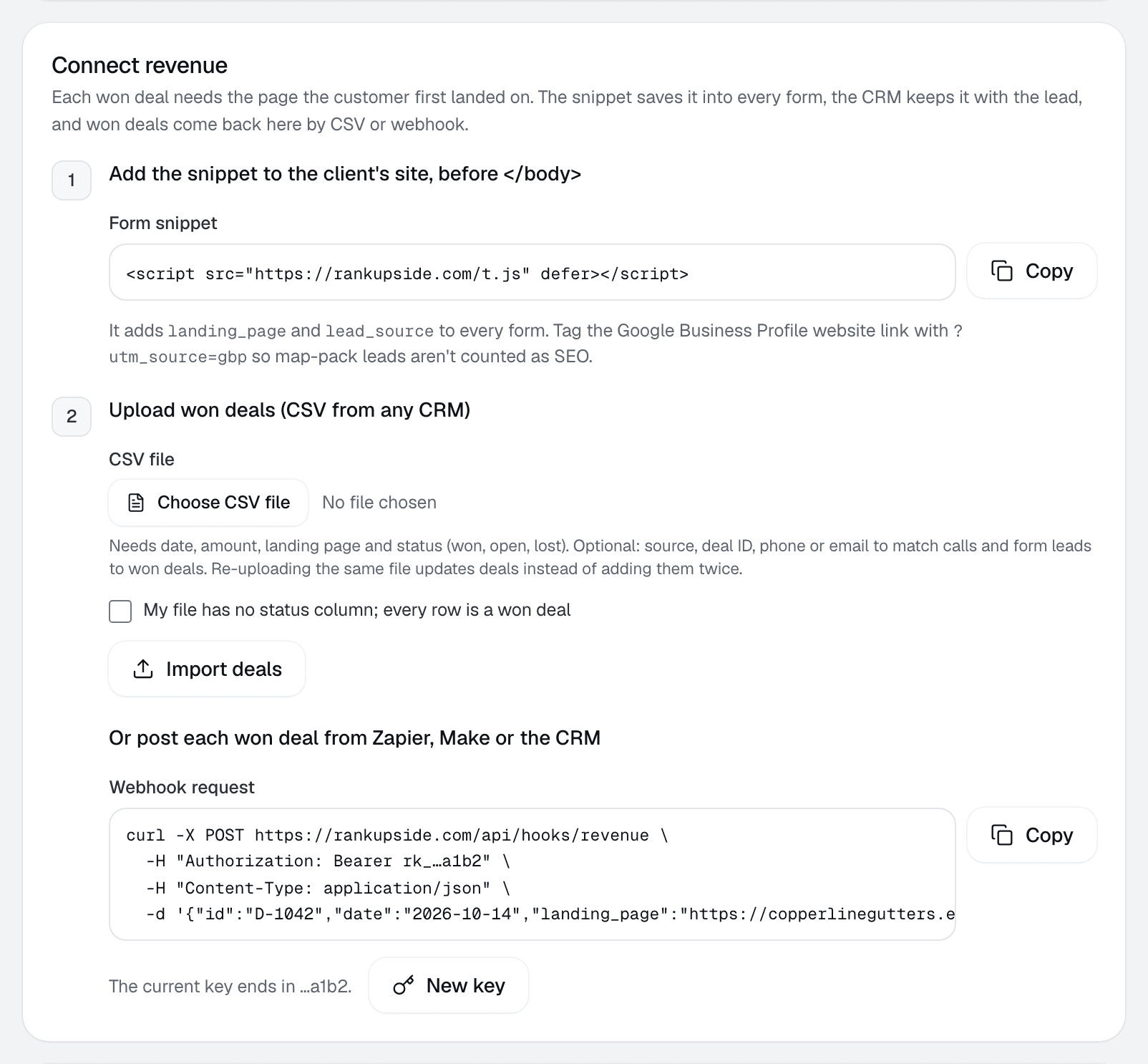
Forms: a small script fills hidden fields on every form. RankUpside's form snippet adds landing_page and lead_source, and the CRM stores them with the lead.
Calls: call tracking such as CallRail or WhatConverts sends the landing page with each call.
The CRM: keeps the page on the deal when it's won.
Tag the Google Business Profile website link so map-pack leads stay separate:
Export won deals with a date, an amount and the landing page, or send each one by webhook when it closes. Each deal then joins to that page in Search Console.
Deals with no landing page, or on a page with no search clicks, show as unmatched. Never guess them.
Deals whose source names another channel (ads, social, Yelp or the Business Profile) are left out of search revenue.
A blank source is counted and flagged, so you can fix it in the CRM.
Step 3: split each deal by click share
Each deal is split across its landing page's searches by each search's share of that page's clicks. RankUpside uses the last 13 weeks of clicks for the split. In the sample, the $4,200 gutter guard install landed on the home page, which had 32 search clicks. Two named buyer searches sent one click each, so each is allocated $121. The other $3,998 stays with other searches and the ones Google hides.
Searches behind the revenueSampleFictional Copperline Gutters deals, split the way the report splits them.
Say how much of the revenue ties to named searches and how much sits with searches Google hid. In the sample, 84% of Copperline's clicks have no search term, and $558 of $5,390 in won deals lands on named buyer searches. Showing that gap is what makes the rest of the number believable.
What to say in the meeting
Four sentences you can reuse, with your client's numbers in place of the letters:
"Three won deals this period came in through pages that get search traffic, worth $X in total."
"On the gutter guard page, the searches Google names sent Y% of its clicks, so we've allocated $Z of that page's revenue to them."
"The rest came from searches Google doesn't name. We keep it on its own line instead of guessing which searches they were."
"These figures are allocated by share of clicks. They're consistent with search bringing these customers in; they don't show that one search caused a sale."
Wording rules: say "allocated" and "consistent with". Never "earned", "generated" or "caused".
When the client has no CRM data yet
Start with search traffic value: the client's search clicks priced at what the same clicks would cost in Google Ads, labeled an estimate, with the share of clicks that could be priced. It's a replacement cost, so never add it to revenue. See ad-equivalent value.
Add buyer clicks next to it, and leads by page if call tracking is connected. To size what search could be worth from the client's own lead numbers, use the SEO revenue calculator.
Common mistakes
Crediting all organic revenue to the top keyword.
Adding ad-equivalent value to revenue.
Using last-click analytics revenue as if it were search revenue.
Hiding the unmatched deals instead of listing them.
How RankUpside does this
Won deals come in by CSV from any CRM, by webhook, or through the form snippet on the client's site. Once a client has won deals, the report adds a "Pages that brought paying customers" section with the split above. Without won deals the section doesn't appear, and the report's summary always leads with what moved.
You can show which won deals came through pages that get search traffic, and allocate each deal across that page's searches by click share. You can't prove a specific search caused a specific sale, because Google Search Console reports totals, not visitors. Say "allocated" and show the coverage.
How do you tie a sale to a Google search?
Record the landing page on every lead, keep it on the deal in the CRM, then match won deals to that page in Search Console. Each deal is split across the page's searches by their share of the page's clicks.
What about the searches Google hides?
Google withholds the search terms behind part of every site's clicks. Keep those clicks on their own line in the split, so no visible search is over-credited. In the sample report it's 84% of the clicks.
What if my client doesn't use a CRM?
Start with search traffic value: the client's search clicks priced at what the same clicks would cost as Google Ads, labeled an estimate. Add won deals later from a spreadsheet export with a date, an amount and a landing page.
Should I report a single return figure to clients?
Show allocated revenue against the work done, with its coverage and limits, and let the client draw the comparison. One return figure hides how much of the revenue is tied to named searches.
How long a window should I use?
Long enough to hold several deals per page. RankUpside splits revenue using the last 13 weeks of search clicks, which smooths out week-to-week swings.
Copperline Gutters got 27 clicks from named buyer searches in the last 4 weeks, up 23% from the 4 weeks before. Google hides the search terms behind 84% of all 289 search clicks. Rankings rose across the site: pages that steadily show up are up about 2.4 positions.