Skip to content
Glossary

Ad-equivalent value (search traffic value)

Ad-equivalent value is what a client's organic search clicks would cost if bought as Google Ads clicks: each search's clicks times its cost per click, added up. It gives a dollar figure for search traffic on day one, before any won deals are connected. It's an estimate of replacement cost and never counts as revenue.

What it doesn't do: It doesn't measure sales or profit, and it can only price searches that have cost-per-click data, so it always shows its coverage.

Updated

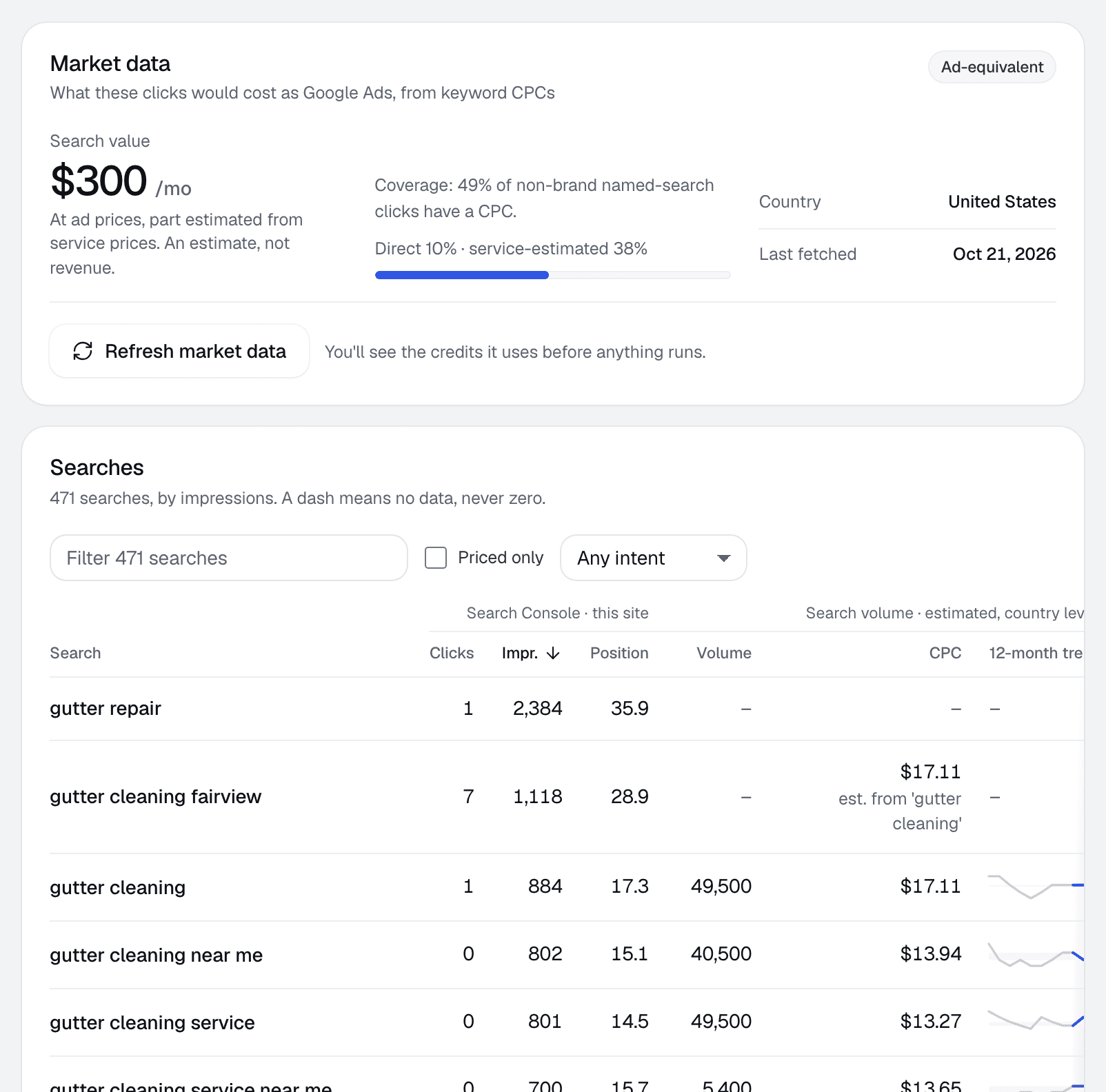
Market data for one client: the search value at ad prices, and a table of searches with clicks, impressions, position, volume, cost per click and 12-month trend.
Client page › Searches · Sample data

The formula

value    = Σ (clicks on search × cost per click of search)
coverage = priced clicks ÷ all clicks

How it shows up in RankUpside

The search traffic value tile on the client page and the report reads "≈ $X/mo at ad prices", labeled an estimate, with the share of clicks it could price. It only appears once at least 30% of clicks have a price.

Long, city-specific searches often have no cost-per-click data. When a search is priced from its service instead, the label adds "part estimated from service prices". Dollar figures are rounded so they don't read as more precise than they are: two significant figures from $100 up.

When to show it

It's most useful at the start, before a client has connected won deals. It gives the traffic a size in dollars that a business owner recognizes: this is roughly what the same visits would cost as ads.

Once won deals are connected, allocated revenue is the better money figure. Keep ad value beside it as a separate, labeled estimate, and never add the two together.

How to check it yourself

  1. Export a client's queries from Search Console.
  2. Look up each search's cost per click in Google Ads Keyword Planner or a keyword tool.
  3. Multiply clicks by cost per click and add up the rows.
  4. Note what share of the clicks you could price.

Common mistakes

  • Adding ad value to won-deal revenue.
  • Pricing hidden-query clicks, which have no search to price.
  • Presenting it as "what SEO earned".

Related term: Cost per click

Cost per click is the price each search's clicks are multiplied by.

Cost per clickWhat advertisers pay Google Ads for one click on a search.

See the value tile in the sample report

Ad-equivalent value: questions.

Is ad-equivalent value the same as SEO revenue?
No. It's what the same clicks would cost as ads, a replacement cost. Revenue comes from won deals. RankUpside shows them separately and never adds them together.
Why does the value only cover part of the clicks?
Many searches, especially long ones naming a town, have no cost-per-click data, and Google hides the search terms behind many clicks. RankUpside shows the share of clicks it could price next to the figure.
Where does the cost-per-click data come from?
From keyword data refreshed monthly, labeled as an estimate at country level, or as Google Ads data where that's the source. Client reports never name the data supplier.

Connect a client and see their first report.

The first report builds from 13 weeks of Search Console history as soon as you connect. Start with 3 client sites.

What your client sees each weekSample data
Oxbow & Vane

Weekly search report · Copperline Gutters

Sep 14 – Oct 11, 2026 vs the 4 weeks before

Copperline Gutters got 27 clicks from named buyer searches in the last 4 weeks, up 23% from the 4 weeks before. Google hides the search terms behind 84% of all 289 search clicks. Rankings rose across the site: pages that steadily show up are up about 2.4 positions.

Buyer clicks23%
27from 22
All search clicks14%
289from 253