Skip to content
Integration

Import won deals from any CRM with a CSV

Export won deals from any CRM as a CSV and upload it in the client's settings. RankUpside needs four columns: date, amount, landing page and status. Common header names from HubSpot, Jobber or GoHighLevel exports are recognized without renaming. Re-uploading the same file updates deals instead of counting them twice.

What it doesn't do: A CSV upload is a one-time import, not a sync. For deals that arrive on their own, use the webhook.

Updated

The columns we read.

Headers are matched loosely, ignoring case, so an export from HubSpot, Jobber or GoHighLevel usually works as it is. These are the names the importer recognizes for each field.

Each field the CSV importer reads, whether it's required, and the header names it recognizes
FieldRequiredHeader names recognized
DateRequireddate, closed, close date, closed date, won date, date won, closed at, created, created at, date created, job date, invoice date
AmountRequiredamount, value, revenue, total, deal value, deal amount, invoice total, job total, price
Landing pageRequiredlanding page, landing_page, landing, landing url, page, page url, url, first page, entry page, source url
StatusRequired unless every row is wonstatus, stage, deal stage, outcome
SourceOptionalsource, lead source, channel, medium, utm_medium, utm source, utm_source
Deal IDOptionalid, deal id, deal_id, external id, external_id, lead id, job id, invoice, invoice number, number
Phone or emailOptional, for matching callsphone, phone number, customer phone, mobile, email, email address, customer email
Checked against the app's CSV parser on every build. CSV

More on this:CSV format docs

How status is read.

Lost words are checked first, so “Closed - canceled” counts as lost, never won. Then won words, then open. A file with no status column works if you tick “My file has no status column; every row is a won deal”.

Status words and how each is read
Read asWords in the status column (any case)
Lostlost, declined, canceled, dead, no sale, refunded, no show, …
Wonwon, paid, completed, sold, approved, invoiced, closed, …
Openopen, new, quoted, pending, estimate, scheduled, proposal, …
Only won deals count as revenue. Open deals show as pipeline.

Upload it.

In Client settings › Leads & revenue, choose the CSV file and select Import deals. Rows that can't be read are named with the row number and the value, so you can fix the file and upload again.

  • Example error: Row 7: couldn't read the date "next Tuesday".
  • Dates: 2026-10-14, 10/14/2026 or Oct 14, 2026
  • Amounts with or without $ and commas; negatives and amounts over $10 million are rejected
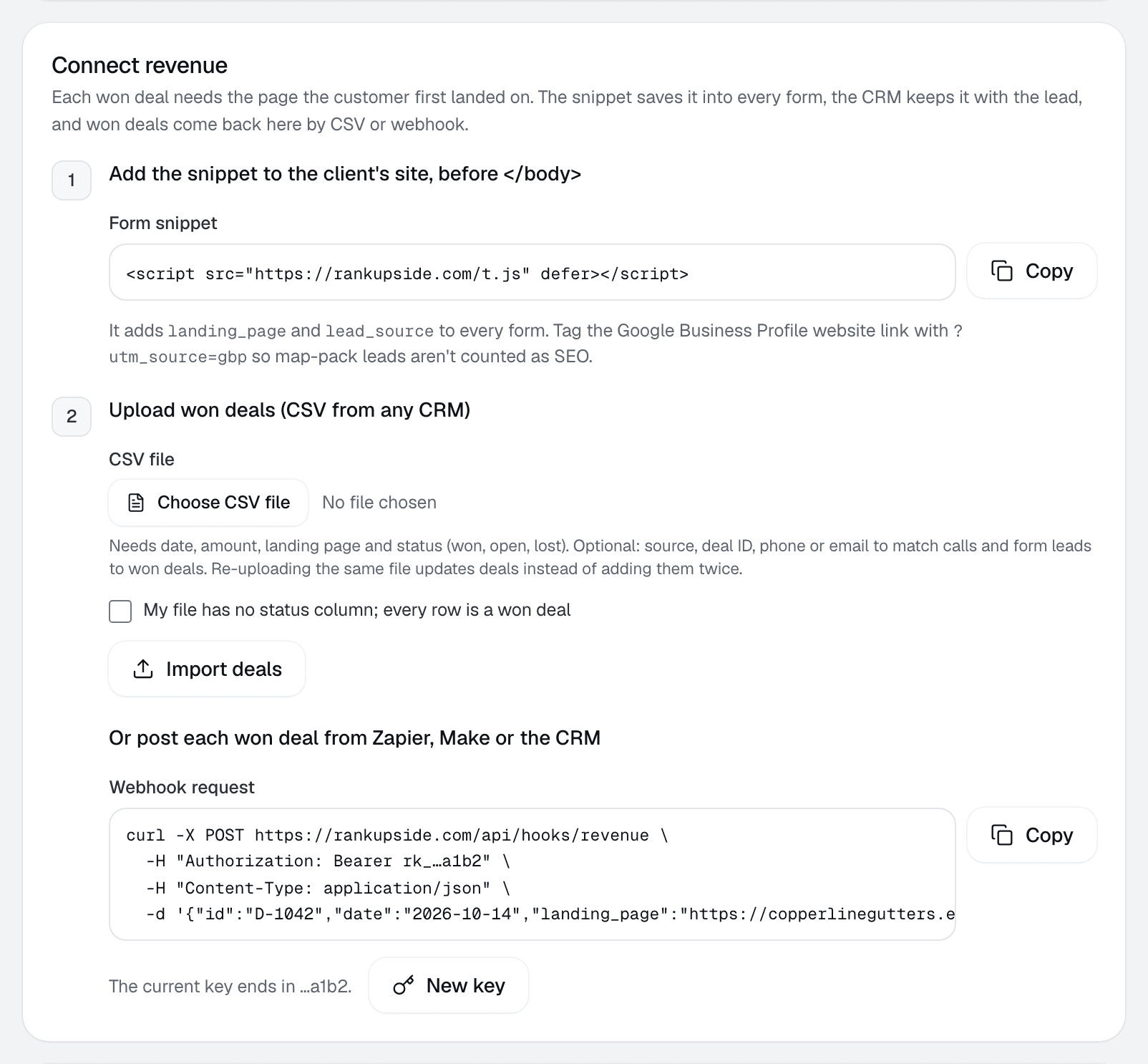
Client settings, Connect revenue: step 2, Upload won deals, with the CSV file picker, the every-row-is-won checkbox and Import deals.
Client settings › Leads & revenue
Start free trialStarts with one read-only Google sign-in. No card.

What happens to each deal.

Each won deal joins to its landing page and is split across that page's searches by click share. Deals with no landing page, or a page with no search clicks, are listed as unmatched. Deals sourced from ads, social, Yelp or the Business Profile stay out of search revenue.

  1. Won dealFrom the CRM: date, amount, landing page
  2. Landing pageJoined to the page in Search Console
  3. Split by click shareAcross that page's searches, 13 weeks
  4. Hidden searchesKeep their own line, never spread

No landing page, or a page with no search clicks in the window: the deal is listed as unmatched and isn't credited to any search.

More on this:Revenue by searchAttribution docsClick-share attributionAllocated revenue

Sample file.

Three won jobs for a fictional gutter company, in three date formats and three ways of saying won. Below it, what the importer reads from the file.

deal id,close date,amount,landing page,deal stage,source
D-1042,2026-10-14,"$4,200",https://copperlinegutters.example/,Closed Won,organic
D-1051,10/09/2026,850,https://copperlinegutters.example/services/gutter-repair,won,google / organic
D-1057,"Oct 3, 2026",340,https://copperlinegutters.example/blog/gutter-cleaning-fairview-cost,Paid,organic
Sample data · fictional deals on a reserved .example domain.
Download the sample CSV

What the importer reads

Parsed by the app's CSV code · 3 deals, 0 errors

Sample data
The sample file as the importer reads it
DealDateAmountStatusLanding page
D-10422026-10-14$4,200won/
D-10512026-10-09$850won/services/gutter-repair
D-10572026-10-03$340won/blog/gutter-cleaning-fairview-cost

Is a CSV a sync?

No. Each upload is a one-time import. For deals that should arrive on their own, post them to the webhook instead.

More on this:WebhooksHubSpotAll integrations

CSV questions.

What columns does the CSV need?
A date, an amount, a landing page and a status of won, open or lost. If your file has no status column, tick "every row is a won deal". Source, deal ID, phone and email are optional.
Do I have to rename my CRM's column headers?
Usually not. RankUpside recognizes common names such as "close date", "deal value", "landing page" and "deal stage". If a required column can't be found, the upload says which one is missing.
What if I upload the same file twice?
Deals update instead of doubling. A deal ID column is used when present. Without one, each row gets a stable ID from its date, landing page, amount and source.
What date and amount formats work?
Dates as 2026-10-14, 10/14/2026 or Oct 14, 2026. Amounts with or without a dollar sign and commas. Negative amounts and amounts over $10 million are rejected as typos.
Why is a deal listed as unmatched?
Its landing page is blank, or that page had no search clicks in the report window. The deal is listed under unmatched deals and isn't credited to any search.
Does a CSV also match calls to deals?
Yes, if it includes a phone or email column. Contacts are stored only as salted hashes, and a won deal links to a call or form lead with the same contact within 120 days.

Connect a client and see their first report.

The first report builds from 13 weeks of Search Console history as soon as you connect. Start with 3 client sites.

What your client sees each weekSample data
Oxbow & Vane

Weekly search report · Copperline Gutters

Sep 14 – Oct 11, 2026 vs the 4 weeks before

Copperline Gutters got 27 clicks from named buyer searches in the last 4 weeks, up 23% from the 4 weeks before. Google hides the search terms behind 84% of all 289 search clicks. Rankings rose across the site: pages that steadily show up are up about 2.4 positions.

Buyer clicks23%
27from 22
All search clicks14%
289from 253