Skip to content
Glossary

Cost per click (CPC)

Cost per click is what an advertiser pays Google Ads when someone clicks their ad for a search. In an SEO report it signals how much a search is worth to businesses: a high CPC usually means buyers. Multiplied by organic clicks, it prices search traffic at ad rates, which is called ad-equivalent value.

What it doesn't do: CPC estimates are averages at country level. Long searches that name a town often have no CPC data at all.

Updated

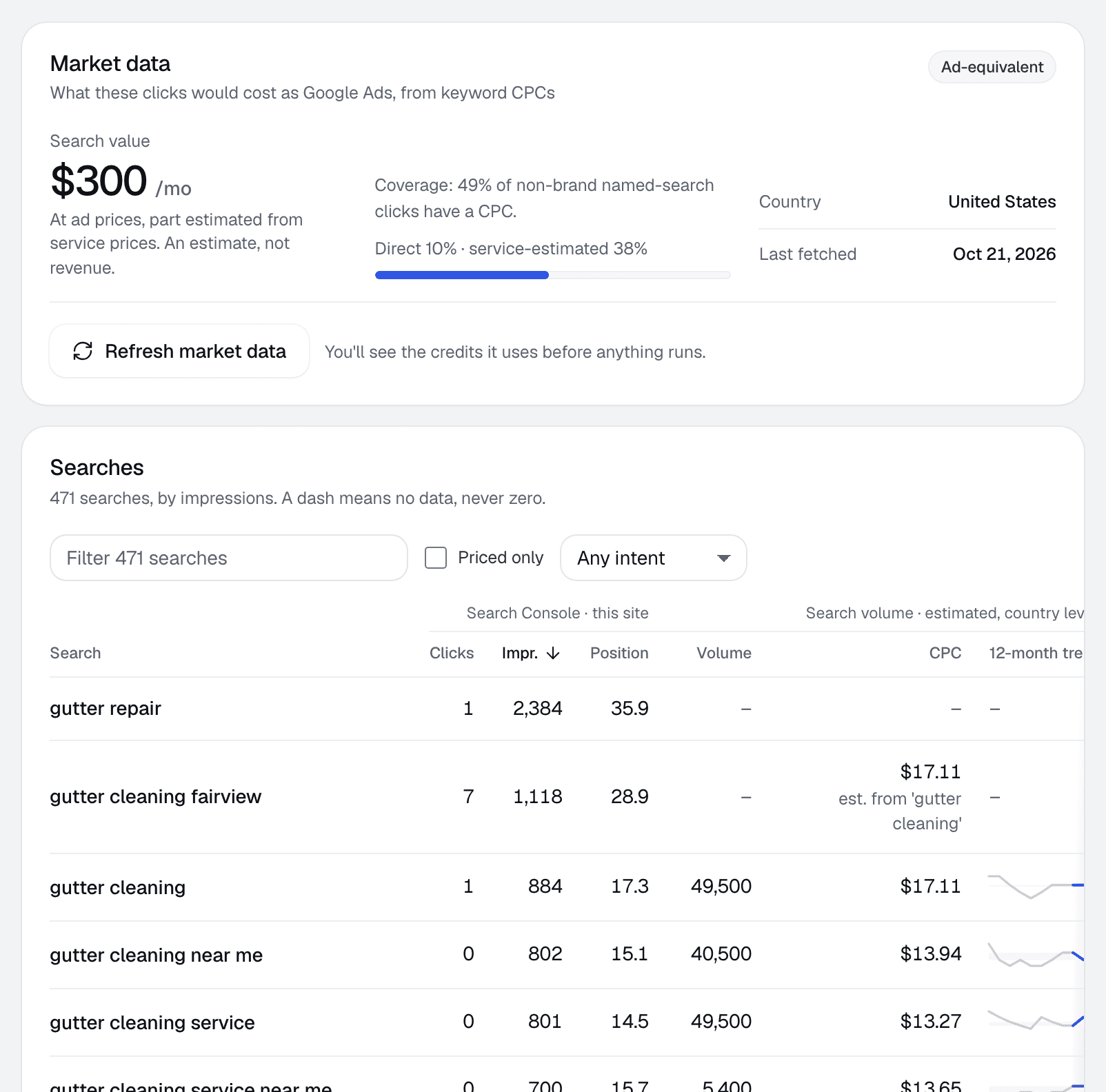
Market data for one client: the search value at ad prices, and a table of searches with clicks, impressions, position, volume, cost per click and 12-month trend.
Client page › Searches · Sample data

How it shows up in RankUpside

Each search in Client › Searches carries its volume, cost per click, a 12-month trend and its intent, refreshed monthly. The source label reads "Search volume · estimated" or "Google Ads data", depending on where the number came from. Client reports never name the data supplier.

Cost per click feeds the search traffic value tile: clicks times cost per click, labeled an estimate. See ad-equivalent value.

Where CPC data comes from

Google Ads Keyword Planner shows bid ranges for a search. Keyword data providers estimate cost per click from their own data. Both are averages for a country or region; there's no reliable "city CPC" for a long, local search.

How to use it in a report

  • Sort a client's searches by cost per click to see which ones advertisers fight over. Those are usually the buyer searches worth defending.
  • Compare a page's top searches with its cost per click before choosing which fix to do first.
  • Show it as context next to clicks, never as money the client made.

How to check it yourself

  1. Open Google Ads Keyword Planner.
  2. Enter the client's top searches and set the country.
  3. Read the bid range for each search, and note which searches have no data.

Common mistakes

  • Treating CPC as what an organic click earns.
  • Counting close variants of one search twice.
  • Reading a missing CPC as zero. It means no data, not no value.

Related term: Ad-equivalent value

Ad-equivalent value multiplies each search's clicks by its cost per click.

Ad-equivalent valueA client's organic clicks priced at Google Ads cost per click.

Cost per click: questions.

Why does an SEO report show cost per click?
Because it's a market signal of what a search is worth. A search advertisers pay a lot for usually has buyers behind it. It also lets the report price organic clicks at ad rates as an estimate.
Why do some searches show no CPC?
Long and town-specific searches often have too little ad data for any estimate. RankUpside shows a dash for them and says what share of clicks it could price.

Connect a client and see their first report.

The first report builds from 13 weeks of Search Console history as soon as you connect. Start with 3 client sites.

What your client sees each weekSample data
Oxbow & Vane

Weekly search report · Copperline Gutters

Sep 14 – Oct 11, 2026 vs the 4 weeks before

Copperline Gutters got 27 clicks from named buyer searches in the last 4 weeks, up 23% from the 4 weeks before. Google hides the search terms behind 84% of all 289 search clicks. Rankings rose across the site: pages that steadily show up are up about 2.4 positions.

Buyer clicks23%
27from 22
All search clicks14%
289from 253